# @zkmake/three-meter

Frame metrics for a three.js renderer, with a small dockable HUD: FPS, CPU and GPU time, stutter
(1% low, p99 frame time, hitches), draw calls, render passes, triangles, and the geometries,
textures and shaders in GPU memory. Zero dependencies. Works with `WebGLRenderer` and
`WebGPURenderer`, with or without React.

```sh
bun add -d @zkmake/three-meter   # or npm i -D / pnpm add -D
```

Live demo: [zkmake.github.io/three-kit/three-meter/demo](https://zkmake.github.io/three-kit/three-meter/demo/), with a vanilla three and a
React Three Fiber take on the same scene. Add `?webgpu` for the WebGPU renderer and `?count=30000` to
load the scene up past the demo's triangle budget.

<table align="center">
  <tr>
    <th></th>
    <th>Expanded</th>
    <th>Collapsed</th>
  </tr>
  <tr>
    <th>Dark</th>
    <td valign="top">
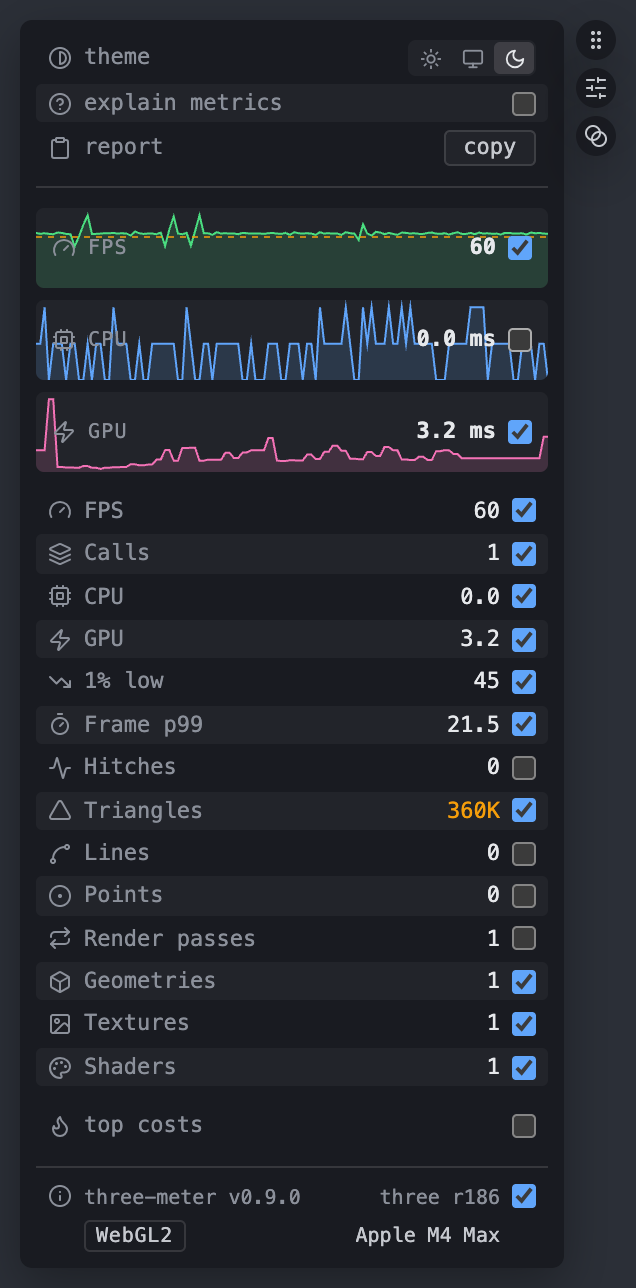
      <img src="https://raw.githubusercontent.com/zkmake/three-kit/main/docs/hud-full.png" width="318" alt="The HUD in full mode, dark theme. Option rows for theme (light, system, dark), explain metrics and a copy-report button; FPS, CPU and GPU sparklines with live values, the FPS graph showing a dashed budget line; then one row per metric, each with an icon, its value and a checkbox choosing whether the compact card shows it (FPS, calls, CPU, GPU, 1% low, frame p99, hitches, triangles, lines, points, render passes, geometries, textures, shaders), with the triangle count in amber for being over its budget; a top costs toggle; and a footer with the three-meter version, the three revision, a WebGL2 backend badge and the GPU name. Three discs beside it: a drag grip, the compact/full toggle and dim on leave." />
    </td>
    <td valign="top">
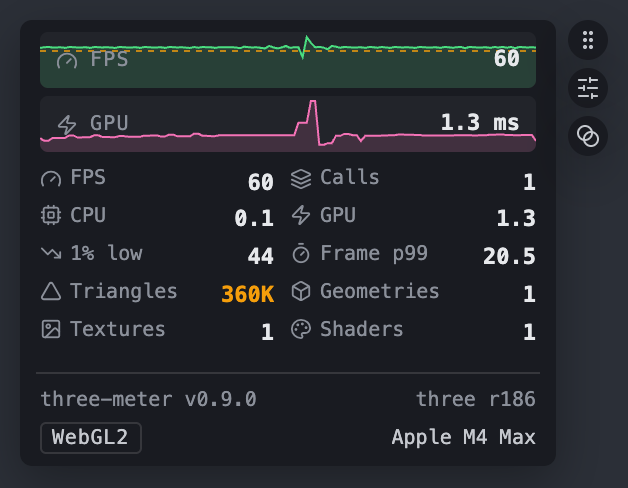
      <img src="https://raw.githubusercontent.com/zkmake/three-kit/main/docs/hud-compact.png" width="314" alt="The HUD collapsed, dark theme: FPS and GPU sparklines with a dashed budget line on the FPS graph, a two-column grid of metrics with icons (FPS, calls, CPU, GPU, 1% low, frame p99, triangles in amber for being over budget, geometries, textures, shaders), and the footer with versions, backend and GPU. Three discs beside it: drag, expand and dim on leave." />
    </td>
  </tr>
  <tr>
    <th>Light</th>
    <td valign="top">
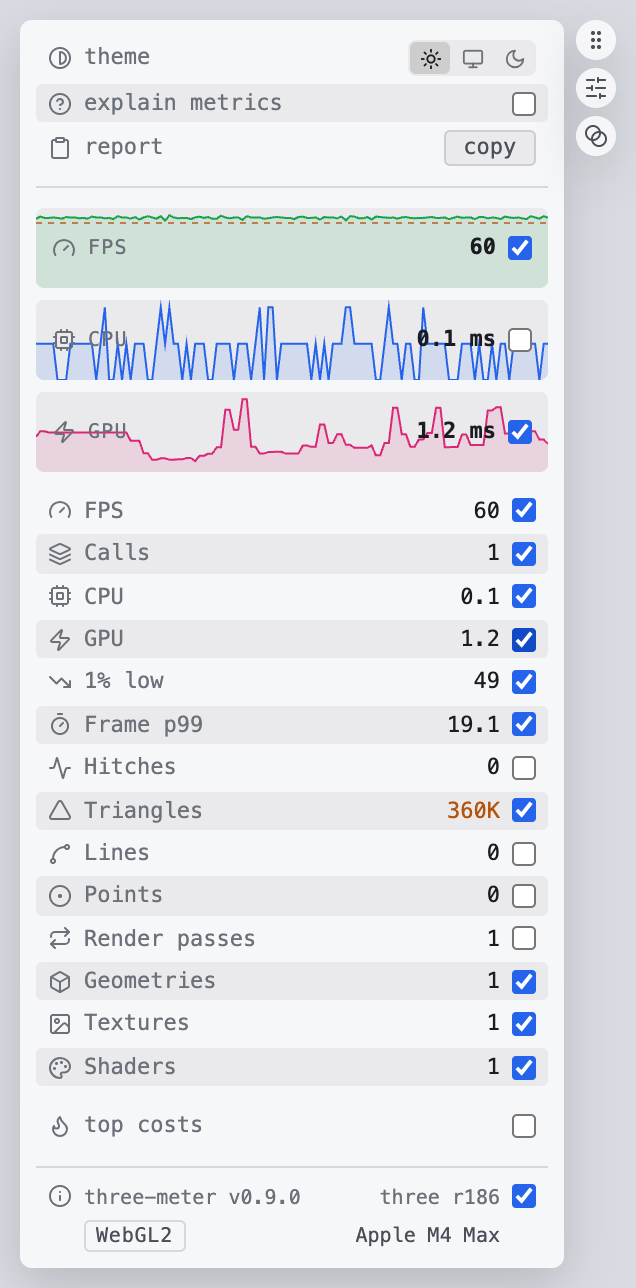
      <img src="https://raw.githubusercontent.com/zkmake/three-kit/main/docs/hud-full-light.png" width="318" alt="The HUD in full mode, light theme. Option rows for theme (light, system, dark), explain metrics and a copy-report button; FPS, CPU and GPU sparklines with live values, the FPS graph showing a dashed budget line; then one row per metric, each with an icon, its value and a checkbox choosing whether the compact card shows it (FPS, calls, CPU, GPU, 1% low, frame p99, hitches, triangles, lines, points, render passes, geometries, textures, shaders), with the triangle count in amber for being over its budget; a top costs toggle; and a footer with the three-meter version, the three revision, a WebGL2 backend badge and the GPU name. Three discs beside it: a drag grip, the compact/full toggle and dim on leave." />
    </td>
    <td valign="top">
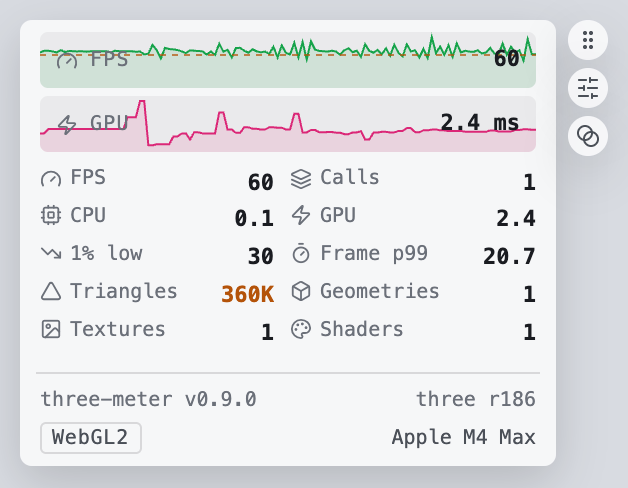
      <img src="https://raw.githubusercontent.com/zkmake/three-kit/main/docs/hud-compact-light.png" width="314" alt="The HUD collapsed, light theme: FPS and GPU sparklines with a dashed budget line on the FPS graph, a two-column grid of metrics with icons (FPS, calls, CPU, GPU, 1% low, frame p99, triangles in amber for being over budget, geometries, textures, shaders), and the footer with versions, backend and GPU. Three discs beside it: drag, expand and dim on leave." />
    </td>
  </tr>
</table>

- **Spot problems at a glance.** Values past their budget turn amber, and every metric explains
  itself on hover, so you don't need to know what a p99 is to see that one is bad.
- **See stutter, not just averages.** 1% low, p99 frame time and hitch counts catch the frame that
  drops every few seconds while the FPS average still reads 60.
- **Real GPU time** from timer queries on WebGPU, and on WebGL in Chrome and Edge, not an estimate
  from frame intervals.
- **Find what's expensive.** A breakdown of draw calls and triangles by mesh and material shows
  which objects to instance or merge.
- **One-click bug reports.** Copy versions, backend, GPU and the current numbers as Markdown.
- **Stays out of the way.** The sampler and the card are separate components, so toggling the HUD
  never remounts your canvas. The card docks to a screen edge, remembers where you put it, and hides
  its controls until the pointer comes near; a third disc there dims it when the pointer leaves.

## Coming from stats.js, stats-gl or r3f-perf

An FPS counter like stats.js or stats-gl tells you a frame was slow. three-meter also shows where
the time went: CPU and GPU time side by side, stutter that an FPS average hides, draw calls and
triangles, and the meshes and materials that cost the most. Like r3f-perf it reads the renderer's
own counters, but it isn't tied to React: the same HUD runs with plain three.js and with React
Three Fiber, on `WebGLRenderer` and `WebGPURenderer`.

## Entry points

| Import                      | What it is                                                                   |
| --------------------------- | ---------------------------------------------------------------------------- |
| `@zkmake/three-meter`       | `PerformanceMonitor`. `begin()` and `end()` bracket a frame. No DOM.         |
| `@zkmake/three-meter/ui`    | `mountPerfHud(monitor, options)`, the dockable card. Vanilla DOM.            |
| `@zkmake/three-meter/react` | `PerfSampler` inside `<Canvas>`, `PerfHud` outside it. Peers: react and r3f. |

`/ui` also exports the pieces under the HUD, for a host composing its own panel: `PerformanceView`
(the card's body), `HudSettings`, `HudTheme`, `mountDevPanel`, `dockPanel`, `injectStyles` and
`PERF_HUD_STYLES`, `resolveBudgets`, `formatReport` and `formatQuality`. The core also exports
`RingBuffer`, and `/react` `createPerfMonitorStore`.

## Vanilla three

```ts
import { PerformanceMonitor, wrapAnimationLoop } from "@zkmake/three-meter";
import { mountPerfHud } from "@zkmake/three-meter/ui";

const monitor = new PerformanceMonitor({ renderer });
const hud = mountPerfHud(monitor); // appends to document.body, docks left-centre

renderer.setAnimationLoop(
  wrapAnimationLoop(monitor, () => {
    update();
    renderer.render(scene, camera);
  }),
);

// later
hud.dispose();
monitor.dispose();
```

If you run your own loop, call `monitor.begin()` before the frame's work and `monitor.end()` after
the render.

Without the HUD, read the monitor: `monitor.getSample()` is the last frame (`fps`, `cpu`,
`gpu: { ms, available }`, `render` counts, `resources`), and `monitor.getHistory("fps" | "cpu" |
"gpu")` the last `historySize` values the graphs draw.

## React Three Fiber

```tsx
import { Canvas } from "@react-three/fiber";
import { PerfHud, PerfSampler } from "@zkmake/three-meter/react";

<>
  <Canvas>
    <PerfSampler />
    {/* scene */}
  </Canvas>
  <PerfHud />
</>;
```

`PerfHud` must sit outside `<Canvas>`, because Fiber treats HTML under it as three objects. The two
components find each other through a small shared store. A React context can't do this, since the
Canvas is its own React root. To run two canvases on one page, give each canvas's `PerfSampler` and
its `PerfHud` the same `store` prop, one `createPerfMonitorStore()` per pair.

`theme`, `mode`, `label`, `budgets` (by value) and `quality` apply live. `defaultPlacement` (by
value), `storageKey`, `parent`, `refreshHz`, `injectStyles` and `store` remount the HUD.

## Options

`mountPerfHud` and `PerfHud` take:

| Option             | Default            | Meaning                                                                                       |
| ------------------ | ------------------ | --------------------------------------------------------------------------------------------- |
| `mode`             | `"compact"`        | `compact` is the card. `full` is the checkbox list that configures it.                        |
| `theme`            | `"system"`         | `dark`, `light`, or `system` to follow `prefers-color-scheme` live. A pick in the panel wins. |
| `defaultPlacement` | `{ edge: "left" }` | First-visit dock, as `edge` plus `align` of `start`, `center` or `end`. A drag overrides it.  |
| `storageKey`       | `three-meter`      | localStorage key for the selection and the dock. `null` disables persistence.                 |
| `parent`           | `document.body`    | Where the host element is appended.                                                           |
| `injectStyles`     | `true`             | Append the stylesheet once per document.                                                      |
| `refreshHz`        | `10`               | Repaint rate.                                                                                 |
| `budgets`          | timing defaults    | Limits past which a value turns amber; `false` for none. See [Budgets](#budgets).             |
| `quality`          | none               | Adaptive quality to show. See [Adaptive quality](#adaptive-quality).                          |
| `label`            | `"Performance"`    | Accessible name of the panel.                                                                 |
| `settings`         | from `storageKey`  | Your own `HudSettings`, e.g. with `defaults` for what a first visit shows. Not on `PerfHud`.  |

`PerformanceMonitor` and `PerfSampler` take `trackGPU` (default true), `gpuQueryPoolSize` (default 5),
`historySize` (default 120) and `frameStatsSize` (default 1000).

## Reading the panel

Every row has an icon, its value, and a checkbox on the right that puts it in the compact HUD. Hover
a label for a one-line explanation of the metric and what a bad reading means, or tick **explain
metrics** to show them all under the rows (also works on touch).

## Stutter

Average FPS hides a hitch every few seconds. Three rows in the full view catch it, and any of them
can be ticked into the compact HUD:

- **1% low**: mean FPS across the slowest 1% of frames.
- **Frame p99**: 99% of frames finish within this many ms.
- **Hitches**: frames over twice the median frame time.

They cover the last `frameStatsSize` frames (1000 by default, about 16 s at 60 Hz). Gaps over a
second, like a hidden tab, are left out. Read them with `monitor.getFrameStats()`:

```ts
monitor.getFrameStats();
// { frames: 1000, lowFps: 97.6, p99Ms: 10.2, hitches: 3, refreshHz: 120 }
```

## Refresh rate and headroom

**Refresh** is the rate the loop runs at when it keeps up: the display's refresh rate, or the app's
own cap if it throttles itself. It comes from the fastest tenth of recent frames, with each interval
averaged against the next so a late frame and the early one after it don't read as a faster display,
then snapped to a common rate (60, 120, 144, …). It needs 60 frames.

**Headroom** is the spare time in each frame: the frame budget minus whichever of CPU and GPU took
longer. At 120 Hz with 3 ms of GPU work that's 5.3 ms. Below zero, frames miss the display's refresh,
and the row turns amber.

## Budgets

A value past its budget turns amber in the full view and the compact HUD, and its tooltip names the
budget. The FPS, CPU and GPU graphs draw the budget as a dashed line once the series reaches it; the
scale never stretches to fit it, so a quiet graph keeps its detail.

Timing budgets come from `targetFps`: FPS at least 95% of it, 1% low at least half, CPU and GPU
within one frame, frame p99 within one and a half, headroom at least zero. Leave `targetFps` out and
they follow the detected refresh rate, so a 120 Hz display gets 8.3 ms budgets (60 until it's
detected). Counts have no default, since what's reasonable depends on the scene. Set your own:

```ts
const hud = mountPerfHud(monitor, {
  budgets: { targetFps: 120, calls: 500, triangles: 2_000_000 },
});
hud.setBudgets({ gpu: null }); // null drops a default; false drops them all
```

A budget goes on any row by its key: `fps`, `cpu`, `gpu`, `headroom`, `refresh`, `low` (1% low),
`p99`, `hitches`, `calls`, `triangles`, `lines`, `points`, `passes`, `geometries`, `textures`,
`shaders`. `fps`, `low` and `headroom` are floors (amber below); the rest are ceilings.

`PerfHud` takes the same `budgets` prop and applies changes live.

An app that keeps its budgets in one file with [three-audit](https://zkmake.github.io/three-kit/three-audit/)'s `defineBudgets`
passes that file as is. The HUD applies its `frame`: `fps` as `targetFps`, `calls` and
`triangles`. The same file holds the per-part budgets its tests and the `three-audit` CLI check.

```ts
import budgets from "./budgets.ts"; // defineBudgets({ frame: { fps: 60, calls: 150, … }, parts })

mountPerfHud(monitor, { budgets });
```

three-meter reads the file's shape (`AppBudgets`) and doesn't depend on three-audit.

## Adaptive quality

A game that adapts its render quality at runtime with [three-quality](https://zkmake.github.io/three-kit/three-quality/) can show
what it's doing: pass the controller, or in React its store, as `quality`. The card gets one line
under the grid, `dpr 1.25 · adapting · shadows off`, and the full view a **Quality** row; hover
either for the level and the last window's p90 frame against the budget.

```ts
const quality = adaptQuality(renderer); // @zkmake/three-quality

mountPerfHud(monitor, { quality });
```

```tsx
import { qualityStore } from "@zkmake/three-quality/react";

<PerfHud quality={qualityStore} />;
```

three-meter reads the shape (`QualitySource`: a `state` with `dpr`, `phase`, `level`, `levels`
and `tiers`), so neither package depends on the other: the game ships three-quality and loads
three-meter behind `?debug`. `hud.setQuality(source)` swaps it later.

## Top costs

The HUD tells you there are 400 draw calls; **top costs** tells you which objects they come from.
Tick it in the full view for the five biggest costs in the main render pass, grouped by **meshes** or
**materials**, sorted by draw calls or triangles. Click a row's name to log its three objects to the
console.

```text
                     calls   tris
tree ×300              300   9,600    ← 300 separate meshes: instance or merge them
house                    6      12    ← one draw per material in the array
dome                     2   7,936    ← transparent and double-sided draws twice
grass ×20,000            1  40,000    ← already instanced
```

Meshes with the same name and geometry share a row, so unmerged copies stand out. The numbers are
estimated from the scene graph the way three walks it: hidden objects, other layers and anything
outside the camera's frustum are left out. Against three's own `renderer.info` on a test scene they
matched exactly. Shadow maps and post-processing passes aren't included; the main pass is the render
call that drew the most, so a full-screen quad rendered last doesn't stand in for the scene. It
walks the scene only while open, twice a second.

```ts
monitor.getSceneCost();
// { calls: 309, triangles: 57548, meshes: [{ key: "mesh:tree…", label: "tree", calls: 300, … }, …], materials: […] }
```

### Test a cost by hiding it

Calls and triangles aren't time. The eye on each row hides its objects, every copy in the scene
including ones off screen, and the row then shows what that saved: GPU time averaged over 30 frames
before and after hiding (CPU time where there's no GPU timer), like `−4.3 ms GPU`. Hidden rows stay
listed so you can show them again. Everything comes back when you untick top costs or the HUD is
disposed, and objects that were already invisible stay that way. `monitor.getObjectsForKey(key)`
returns the same objects for a row's `key`.

## Bug reports

The **report** row's copy button puts a Markdown snapshot on the clipboard: versions, backend, GPU,
the current metrics, the stutter stats, the top three meshes, the viewport and the user agent. Paste it into an issue.
`formatReport(monitor)` from `@zkmake/three-meter/ui` returns the same text.

```text
three-meter v0.10.0 · three r186 · WebGL2 · Apple M4 Max
FPS 120 · 1% low 98 · p99 10.2 ms · hitches 3 / 1,000 frames
CPU 0.2 ms · GPU 0.7 ms · refresh 120 Hz · headroom 7.6 ms
Calls 1 · passes 1 · triangles 24,000 · lines 0 · points 0
Geometries 1 · textures 1 · shaders 1
Top: tree ×300 (300 calls, 9,600 tris) · house (6 calls, 12 tris) · dome (2 calls, 7,936 tris)
Viewport 1280×720 @2x
Mozilla/5.0 (Macintosh; Intel Mac OS X 10_15_7) …
```

## Environment

The full view's footer has two rows: the three-meter version (linked to its release notes) and the
three revision, then the backend and the GPU name. An amber `WebGL2 fallback` badge means
`WebGPURenderer` couldn't get WebGPU. Its checkbox (off by default) shows the footer in the compact
HUD too. The same data is on the monitor:

```ts
monitor.getEnvironment();
// { three: "186", backend: "webgpu", fallback: false, gpu: "Apple metal-3" }
```

`backend` is `null` until `WebGPURenderer.init()` settles. `gpu` comes from WebGPU's adapter info or
WebGL's unmasked renderer string, and is `null` where the browser hides it. Chrome's WebGPU gives
vendor and architecture, not the model.

## GPU timing

On WebGL2 the monitor uses `EXT_disjoint_timer_query_webgl2`, which Chrome and Edge expose. Safari
and Firefox don't, so the GPU row shows `—` and `sample.gpu.available` is `false`.

On WebGPU, construct the renderer with `trackTimestamp: true`. Timings resolve a frame or two late.
The number is how long the GPU was busy in the frame, with overlapping passes counted once. three's
own `resolveTimestampsAsync` sums every pass, which on tile-based GPUs (Apple, most mobile) reads
a post-processing stack at several times its cost; the meter falls back to that sum when three's
timestamp pool isn't the shape it knows.

## Theme

The HUD ships a dark and a light palette. Two layers decide which shows:

1. **The panel's own pick.** The full view has a light / system / dark row. A pick there is kept
   with the other settings under `storageKey` and wins while set.
2. **Your `theme` option.** `dark`, `light`, or `system` (the default), which follows the OS and
   switches when it does. Applies whenever the person using the HUD hasn't picked anything.

Change your layer later from the handle, or from the `PerfHud` prop in React, which applies without
remounting:

```ts
const hud = mountPerfHud(monitor, { theme: "system" });
hud.setTheme("light"); // your layer: "dark" | "light" | "system"
hud.getTheme(); // your layer, as asked for
hud.settings.theme; // the panel's pick, or null
hud.settings.setTheme(null); // clear the pick so your layer applies again
hud.theme.effective; // whichever layer is in force
hud.theme.resolved; // "dark" | "light", what is on screen right now
hud.theme.subscribe(() => syncMyPageWith(hud.theme.resolved));
```

The resolved theme lands on `data-theme` of `.perf-hud` and `.perf-monitor`. To restyle either
palette, override the `--perf-*` custom properties (`bg`, `fg`, `fg-dim`, `muted`, `row`,
`border`, `accent`, `warn`, `shadow`) on those selectors. `warn` is the over-budget amber.

## The dev-panel frame

The HUD's frame is `mountDevPanel` from `@zkmake/three-meter/ui`: the docked host, a card with a
brand label on top, and the drag / expand-compact / dim-on-leave discs. Other zkmake dev panels
(`@zkmake/three-textures`, `@zkmake/three-cameras`) mount through it too, so they all dock, wake,
dim and theme the same way.
A tool of your own can use it:

```ts
const panel = mountDevPanel({
  brand: "my-tool",
  label: "My tool",
  content: myElement,
  theme: new HudTheme("system"),
  storageKey: "my-tool",
  onToggle: () => myElement.classList.toggle("is-compact"),
});

panel.detail.textContent = "3 items"; // the brand row's right-hand slot
```

The card is `.perf-hud__card`, holding `.perf-hud__brand` and your content (the HUD's is
`.perf-monitor`).

## Examples

[`apps/site/src/demos/three-meter`](https://github.com/zkmake/three-kit/tree/main/apps/site/src/demos/three-meter) is what runs at [zkmake.github.io/three-kit/three-meter/demo](https://zkmake.github.io/three-kit/three-meter/demo/):
both integrations of the same scene, swapped from the header.
[`vanilla.ts`](https://github.com/zkmake/three-kit/blob/main/apps/site/src/demos/three-meter/vanilla.ts) is plain three with `mountPerfHud`;
[`r3f.tsx`](https://github.com/zkmake/three-kit/blob/main/apps/site/src/demos/three-meter/r3f.tsx) is React Three Fiber with `PerfSampler` and
`PerfHud`. Both set a 250K triangle budget on top of the timing defaults. `?r3f` opens on Fiber,
`?webgpu` uses `WebGPURenderer` in either, `?count=` scales the scene. The header's theme toggle sets the page theme and the HUD's `theme` layer together; the row
inside the panel overrides the HUD alone. Run `bun run dev` in `apps/site` after a `bun install` at the repo root.

## Shipping it

Styles inject at runtime by default. To link them instead, pass `injectStyles: false` and import
`@zkmake/three-meter/styles.css`.

The package never reads `NODE_ENV` or `import.meta.env`. Whether the HUD exists in production is
your call. Gate the import in the app with a `?debug=` query, a build flag or a dynamic `import()`.
[three-devtools](https://zkmake.github.io/three-kit/three-devtools/) is that gate, done once.

A dynamic `import()` only keeps the HUD out of the first load if the bundler leaves it in its own
chunk. A catch-all chunk group that sends every `node_modules` module to one `vendor` chunk (Vite's
`codeSplitting.groups`, `manualChunks`) pulls the meter into a chunk `index.html` preloads, so every
player downloads it. Leave `@zkmake` out of that group:

```ts
// vite.config.ts, build.rolldownOptions.output.codeSplitting.groups
{
  name: "vendor",
  // Everything in node_modules but @zkmake, whose dev tools load behind ?debug.
  test: /^(?!.*[\\/]node_modules[\\/]@zkmake[\\/]).*[\\/]node_modules[\\/]/,
  priority: 10,
},
```

Then check a production build: no chunk that `index.html` loads or preloads contains
`PerformanceMonitor`.

## Contract

While a monitor is attached, `renderer.info.autoReset` is off and `begin()` resets `info`. One
monitor per renderer. A second throws. `dispose()` restores everything. Theme with the `--perf-*`
custom properties on `.perf-hud` and `.perf-monitor`, or the `theme` option.

## Contributing

See [CONTRIBUTING.md](https://github.com/zkmake/three-kit/blob/main/CONTRIBUTING.md). Changes ship with a changeset.

## License

MIT